Get all facts at a glance Download our PDF
Free product webinar: let an expert explain CrewBrain to you! Join now

Structuring projects and orders

From the festival with four stages to a single setup day – a structure that grows with you.

CrewBee – AI Assistant

A production is not a single date

A three-day festival consists of setup days, show days, a travel day and the dismantling. Across all of those days a great deal stays the same – often the same customer, the same location, the same contacts. And where a company serves several customers or several locations within the same festival, that too belongs to one production. In a flat calendar or a spreadsheet, every day nevertheless stands on its own. If a contact changes, you maintain that in many places. And if somebody asks what the production cost in total, the search begins.

In CrewBrain the jobs hang off a project. What applies to all days is maintained once – and what makes up the project as a whole sits in one place instead of being spread across individual entries.

Four building blocks, one example

The three-day festival with two stages shows the structure in just a few sentences.

1

Project

Bundles everything that belongs to one order. In the example: the three-day festival with everything that counts towards it.

2

Main job

The individual job within the project. In the example: setup, show day 1, show day 2 and dismantling.

3

Sub-job

The subdivision of a job when work is carried out in several places at once. In the example: stage A and stage B on the same show day.

4

Solo job

The job that stands on its own: without sub-jobs and not a sub-job itself. In the example: the site visit ahead of the event – with or without a project behind it.

On top of that, CrewBrain distinguishes the day types you have set up: working day, travel day and day off. For multi-day productions with travel, that is the difference between a plausible and an unusable evaluation.

The decisive point: the hierarchy is optional upwards and downwards. A single job needs no project, a festival can be subdivided as deeply as you like – and both live in the same system.

The job dialog

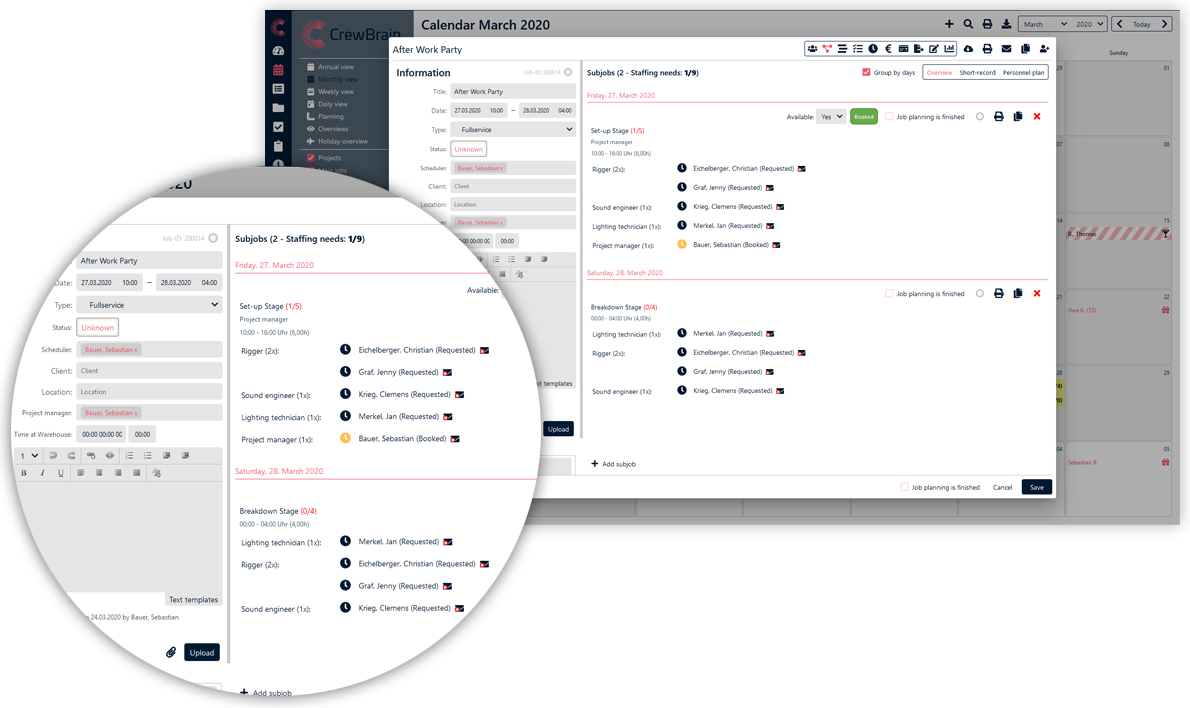
What belongs to a job is organised in tabs: master data, description, location, contacts and additional data. Each job holds one dispatcher and one project manager, plus the contacts at the customer and at the location. Documents, comments and images are filed directly on the job.

The practical benefit: whoever needs to know something on the day of the job finds it on the job – not in an email thread and not with the colleague who happens to be unavailable.

Sub-jobs in the calendar

Numbers and status

Automatic number ranges

Project numbers are assigned consecutively, based on the year or manually; job numbers by year, by project-main-sub-job or manually. The scheme is configurable – so the pattern you are used to from accounting can be carried over.

Status with colour coding

Every job carries a coloured status; nine colours are available. In the calendar the current state is therefore recognisable without a single click.

The number is what brings billing, a customer query and post-calculation together. If it follows the familiar scheme, nobody has to rethink.

Copying, series, converting

Jobs are copied once, several times or as a series – repeated daily, weekly, monthly or yearly. And an individual job can be converted into a project afterwards.

Because orders grow: one setup day turns into three, a solo job turns into a project with sub-jobs. Without conversion that means creating everything anew and retyping – with it, it does not.

The view of the project

Project overview, project documentation, project statistics and a project dashboard are available as separate views; in addition, hour quotas can be managed per project. From there the path leads directly into the statistics, the payroll & statements and the time recording.

Structure and scheduling

The structure says what is to be done – on which day, at which stage, for which customer. Who does it is decided by personnel planning: requirements per qualification, request, booking and conflict checking. Both work on the same jobs – which is why time recording and billing arise from the same structure without double entry. Recurring to-dos per job are covered by task management.

Frequently asked questions

Do I need a project for every order?

No. For a small order a solo job is enough – a job that stands on its own and manages without a project. You only create a project once several jobs belong together. Conversely, a project may well contain a solo job – the site visit beforehand, for example.

How deeply can a project be subdivided?

A project bundles main jobs, and every main job can be split into as many sub-jobs as you like. One level thus maps the job and the level below it the parallel working locations of the same day.

Can project numbers follow our existing scheme?

Yes. Project and job numbers are configurable – consecutive, year-based or manual – so the pattern you are used to from accounting can be adopted.

Can an individual job be converted into a project afterwards?

Yes. A solo job turns into a project with main and sub-jobs when required – without creating the existing data anew.

Can documents and comments be stored on the individual job?

Yes. Documents, comments and images are filed directly on the respective job, so that on the day they are to be found where they are needed.

How are travel days distinguished from working days?

Via the day type: CrewBrain distinguishes the types you have set up – working day, travel day and day off – and assigns them per day. This keeps it recognisable in the evaluation which day was of which type.

Anführungszeichen linksAnführungszeichen rechts
RheinlandAkustik VT GmbH

We have been using CrewBrain 2021 for all our staff and vehicle planning and are super satisfied with the software. We can't imagine our everyday work without CrewBrain. It offers numerous options that... mehr

Philipp Suckrau, Managing Director
Sinus Event-Technik GmbH

When it came to a decision on a software for personnel planning, several solutions were available. We are happy to have chosen CrewBrain. The possibilities to plan each project very quickly and in detail... mehr

Thorsten Schmidt, Managing Director
BENZ & CO. Gastronomie GmbH

At that time, we were looking for a solution to effectively plan and reach internal as well as external staff. CrewBrain stood out because of the easy connection to external service providers and the great... mehr

Jochen Stubner, Head of Controlling/Purchasing
BigRig Berlin GmbH

For a long time, we were looking for a scheduling software that would make our daily work comprehensively and sensibly easier. We became aware of CrewBrain in the summer of 2016. After six months of intensive... mehr

Malte Jäger, Managing Director
mls magic light & sound GmbH

Since we have been using CrewBrain for our entire personnel planning, the daily time expenditure for our dispatchers has decreased significantly. But above all the employees appreciate the new overview... mehr

David Floss, Operations Manager
Billmann Event GmbH

After a test phase in the fall of 2022, we have been using CrewBrain as our central project and scheduling tool since December. Above all, the simple handling for creating projects lasting several days... mehr

Markus Urbon, Operations Manager

The right package for every purpose.

Essential, Standard, Enterprise and various extensions.

 Plans & pricing
4.45 M+successfully plannedevents
45,600+Usersfrom 6 different industries
8.51 M+Status notificationssent 2025

7Languages
24Countries
459Cities

Try now for 30 days

Questions?

Write to us. We will get in touch with you immediately.

Name
E-Mail
Subject
Message:

By submitting the contact form, we process your specified personal data in order to answer your request according to our data protection policy.