 EN
Try now
Login
EN
Try now
Login

CrewBee, multilingual risk assessments and other improvements for CrewBrain
Dear customers,
The festival season is drawing to a close and many of our customers are once again finding a little more time to work through the topics that have been left aside in recent weeks. For us, this is the perfect moment to present a new CrewBrain version with lots of great new features.
Alongside our new AI assistant CrewBee, of which we are particularly proud, we have significantly expanded the risk assessment in particular for this version and now offer the option of creating assessments in several languages in parallel. CrewBrain itself is also available in two new languages: Portuguese and Swedish.
We would like to tell you about everything else that is new in this update info. As usual, the update will be available in all CrewBrain accounts from tomorrow.
We continue to wish you every success with CrewBrain
Your CrewBrain team
CrewBee – our digital assistantAs early as the end of 2025, we were one of the first providers in the industry to enable a complete connection of CrewBrain to any AI assistant via an MCP server. Now we are all the more pleased to once again be doing pioneering work in the industry with our fully-fledged AI assistant CrewBee. |
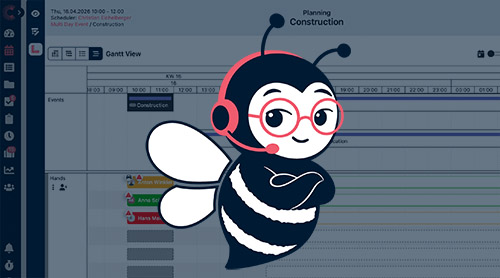 |
Creating & maintaining dataCrewBee is able to create and maintain data in CrewBrain. Whether it is a list of extended employee data, the creation of new projects or a general pay rise for employees – CrewBee checks and updates the data from Excel lists or natural language. |
AI summariesFor every project, CrewBee creates a clear summary of all open items. Are tasks still outstanding? Is staff still missing? All of this can be seen quickly and easily, without laboriously clicking through the individual parts of the project. |
Knowledge modeIn knowledge mode, CrewBee explains CrewBrain – not only in writing, but if required also directly in the interface by highlighting the functions you are looking for. In this way, CrewBee helps with the daily use of CrewBrain and at the same time ensures that previously undiscovered functions can boost productivity. |
AvailabilityCrewBee is available in knowledge mode to all customers free of charge. If CrewBee is to analyse, create or update data, billing is transparent and based on actual usage volume – a prepaid credit can be topped up in CrewBrain for this purpose. The AI project overview also becomes a permanent part of our Enterprise plan and is available there free of charge. |
PermissionsCrewBee is automatically available to all users in knowledge mode and thus replaces our previous support chat. For the extended modes, including the creation of data, there is a new right in the user groups that can be used to determine who should have access and who should not. |
Further informationCrewBee - the AI assistant inside CrewBrain - quick overview (YouTube, 2:07 minutes)
|
Risk assessmentThe risk assessment is an extremely important part of all productions. Due to the shortage of skilled workers, foreign-language employees and temporary staff are repeatedly deployed, who also need to be instructed and require access to the risk assessment. We have now finally solved precisely this issue. |
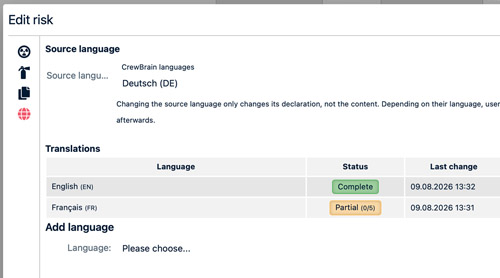 |
Creating translationsFirst, for all existing data in the risk assessment, you need to define the language in which it was recorded. This „default language“ controls into which additional languages the hazards and entire assessments need to be translated. Translations for further languages can then be added. |
AI translationsFor every language that is newly recorded, there is the option of obtaining an AI suggestion for the texts to be translated. This suggestion can then be adjusted individually. |
Fields of activity and factorsThe fields of activity and hazard factors can also be translated into all relevant languages, so that this data is also available to users in their respective language. |
Retrieving assessmentsWhen a user retrieves a risk assessment, it is automatically displayed in their language. If no translation is available for their language, the texts from the default data record are shown – usually the basic company language. |
Mentions & notificationsSo that important information reaches the right people, in future you can mention other people directly with @ in comments and descriptions, thereby involving them specifically in the communication. |
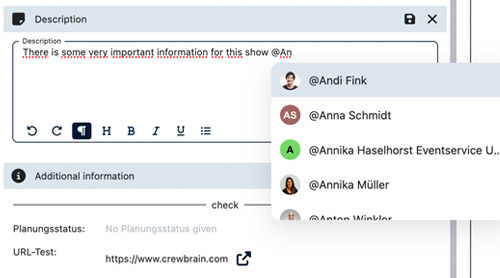 |
Tagging peopleIn comments and descriptions, you can now easily mention colleagues with @. Simply start typing the name and select the desired person from the suggestion list. |
Automatic notificationsWhen a person is mentioned, they can automatically receive a notification and are thus informed directly about the relevant comment or description – without any separate note or additional email. |
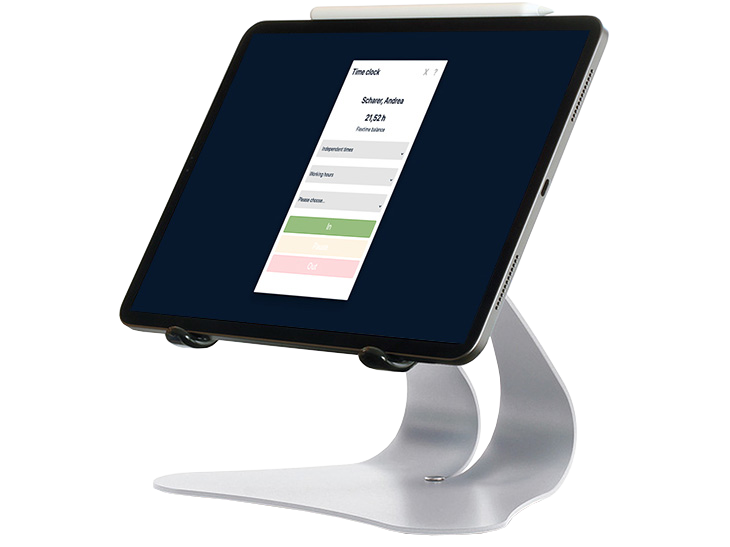
Billing & time trackingAs usual, we have again made enhancements in the area of billing & time tracking. This update is primarily about our API and the related adjustments. |
 |
Break definitionsThe rules for break deductions have now been moved into so-called break definitions. These therefore only need to be stored once and no longer for each employee, and when changes are made, an adjustment can be applied to all employees en bloc as of a key date. |
Capping definitionsAs with breaks, we have also moved the capping rules into their own definitions. These can now be defined globally once in the administration and then reused in the billing periods. |
API endpoints for billing periodsCrewBrain now offers API endpoints via which billing periods can be created and edited for employees, freelancers and service providers. This now makes it possible to carry out general pay rises and other across-the-board adjustments. |
|
Further adjustmentsAs usual, we have also made further adjustments in this version that we do not want to leave unmentioned here: |
 |
|
|