

For technical production
Crew Management Software for Technical Production
Build and strike days, changing departments, half the crew from subcontractors – and the job data has been sitting in your rental system all along. CrewBrain schedules crew, vehicles and subcontractors across multi-day productions and takes the jobs straight out of your rental software.
No payment method required
- Audio ECEmma Carter confirmed
- Lighting JTJake Turner confirmed
- Rigging – open
- Staging – open
- Driver (CDL) – open

A production is rarely a single date
Delivery on Thursday, build on Friday with twelve people, show day on Saturday with six, strike overnight with twenty. Three departments, three different crews, partly the same names on different days. A third of the crew are freelancers, another third comes from a subcontractor. Vehicles and people belong together, and the job data is already in the rental system – just without the humans.
You know this business better than any web page can tell you. So, without preamble: CrewBrain is the crew side of your production. It mirrors the structure of a project, schedules crew and vehicles together, and records the contractual basis of every assignment – connected to the rental software you already run.
The four bottlenecks in technical production
Four things cost time in every production. Each has a specific function behind it.
- 01One project, many line-upsMap a multi-day production onto a weekly overview and you lose either the overview or the detail. Build and strike days have different requirements from the show day.
- 02Half the crew is not on the payrollFreelancers, subcontractors, colleagues from the network. Each needs a different contractual basis, and how you classify them decides more than just the invoice.
- 03Without a vehicle nobody arrivesWhoever drives the 7.5-tonne truck needs the right licence class. The vehicle has to be booked before the tour is set – and its inspection must not fall due during the build.
- 04The job data already existsClient, venue, dates, departments – it is all in the rental system. Retype it into crew planning and you are maintaining two versions of the truth.
What CrewBrain puts against each bottleneck
- Projects with structure, not a list of datesProject, main job, sub-job and solo job in one hierarchy; working days, travel days and days off kept apart; recurring dates and a copy function for productions that come back every year.
- External crew on a clean basisService contracts including electronic signature, subcontractors with their own crew – and if the subcontractor also runs CrewBrain, requests and bookings synchronise between both accounts.
- Vehicles belong in the scheduleVehicle booking, licence class as a condition of assignment, inspection dates with advance warning, a digital driver’s log from the app. That is how crew and kit actually reach the venue. More on fleet management
- The rental system stays the masterReady-made connections pull in jobs, schedules, clients, venues and the crew requirement; on top of that a REST API and webhooks. You type nothing twice. More on the interfaces
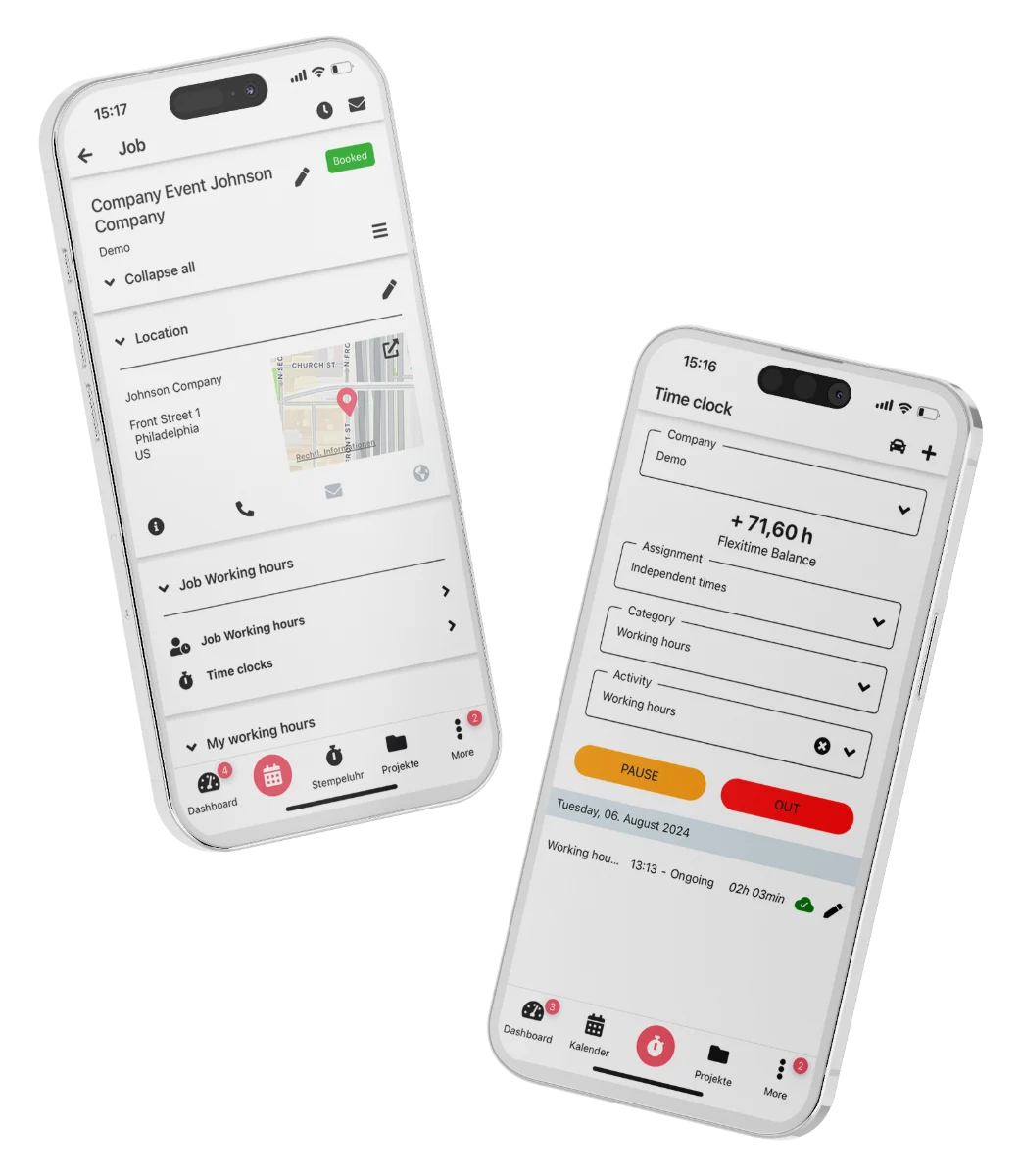
From the first request to the hours report in one system.
Add new resource
Overview September 2026
| Pers.-No. | Name | Planned | Actual | Overtime |
|---|---|---|---|---|
| 1024 | Carter, Emma | 160.00 h | 171.50 h | +11.50 h |
| 1031 | Turner, Jake | 160.00 h | 158.00 h | -2.00 h |
| 1047 | Ramirez, Luis | 120.00 h | 126.25 h | +6.25 h |
| 1052 | Reed, Tyler | 80.00 h | 80.00 h | 0.00 h |
| 1060 | Bennett, Chloe | 160.00 h | 149.50 h | -10.50 h |
Month closed
Certificates and safety in technical production
Qualifications and certificates are held with expiry warnings – the kind this trade works with: recognised event-technology qualifications, electrical competence, work at height with personal protective equipment, forklift tickets, driving licence classes, first aid. In scheduling you see right away who holds the required record.
Safety sits alongside it: risk assessments per activity, vehicle and venue, safety briefings with read receipts, a digital first-aid log. Which records you have to keep is decided by your business and the rules that apply to it – CrewBrain monitors the validity. More on risk assessments
The rental system says three technicians are needed – CrewBrain settles which three
In technical production, planning depends on the connection to the rental system. These five rental and production systems are the ones most widely used internationally; further systems follow through the open API.
 RentmanRental management
 Current RMSRental management
 HireHopEquipment hire
 FlexRental & production
 easyjob (Protonic)Rental management
Every connected system and the open interface are listed in the interfaces overview.
Travel, install, tour
Productions rarely happen on your own doorstep. That is why CrewBrain treats travel days as their own type of day alongside working days and days off. Meal allowances are calculated from the travel itinerary, receipts move from the app into the record as a photo, and overnight and truck allowances are held ready.
At the end sits an approval and payment process: the crew member submits, you approve, and travel expenses run into the settlement together with the hours. On tour especially, where a crew is away for days, that removes the evening paperwork session. More on travel expenses
Departments, categories and the right head on the right day
Audio, lighting, video, rigging, staging – every department has its own roles and its own requirements. In CrewBrain you set up crew categories and qualifications so that scheduling shows you right away who actually knows the department. The experienced systems engineer stands on the show day, the stagehands on the build, the climber only where their certification is valid.
Because availability, workload and previous assignments run alongside, you see immediately who has already worked too many hours this week and who is still free – across several parallel productions. The line-up comes out of what the pool actually offers.
Frequently asked questions
Can multi-day productions be planned with a different crew each day?
Yes. A project breaks down into main and sub-jobs with their own days and their own requirement. Build, show day and strike each get their own line-up, even when the crew changes from day to day.
How are freelancers and subcontractors handled contractually?
Freelancers receive service contracts with electronic signature; subcontractors are kept together with their own crew. Every assignment carries the basis you recorded for it, so the classification stays traceable later.
Can CrewBrain connect to our existing rental software?
There are ready-made interfaces for a number of systems, among them Rentman, Current RMS, HireHop, Flex and easyjob. Beyond those a REST API and webhooks are available for connecting further systems.
Are vehicles scheduled together with the crew?
Yes. Vehicles are booked like people, with the licence class as a condition and advance warning for inspection dates. The digital driver’s log is created straight from the app.
How are travel days and meal allowances settled?
Travel days are their own type of day. Allowances are calculated from the itinerary, receipts are added as photos, and everything runs through an approval process into the settlement.
Technical production is one of several industries for which CrewBrain bundles the relevant functions. The software for the live event industry gives you the overview, and if you supply crew to other companies rather than staffing your own productions, see software for staffing agencies.
Try CrewBrain for 30 days with your real schedule.
Full feature set, no payment method required. Or let us show you CrewBrain in 20 minutes.